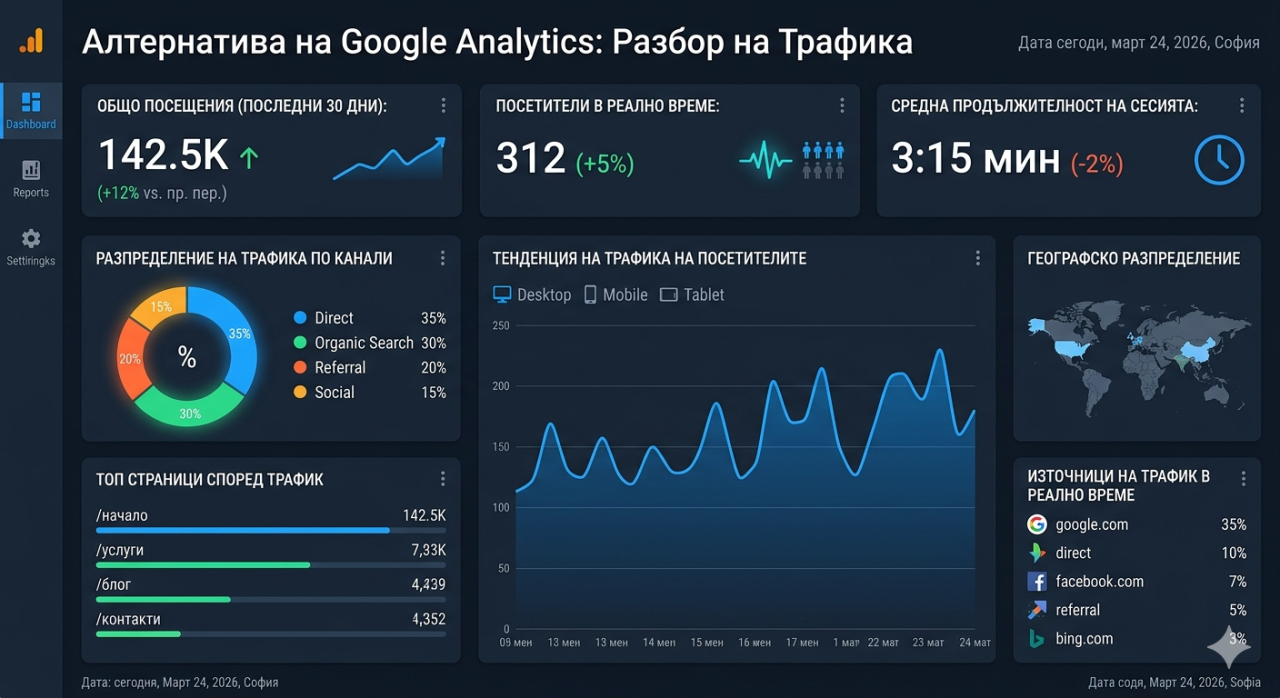
ฉันสร้างทางเลือก Google Analytics สำหรับ WordPress เพราะการวิเคราะห์กลายเป็นซับซ้อนเกินไป
สมัยหนึ่ง Google Analytics นั้นตรงไปตรงมา Universal Analytics ตามที่เรียกกันในปัจจุบัน มีแถบด้านข้างที่ชัดเจน: Audience, Acquisition, Behavior, Conversions การคลิก "Audience Overview" แสดงจำนวน pageviews, sessions, users, bounce rate และระยะเวลา session เฉลี่ย ข้อมูลนั้นมีประโยชน์ทันที มีกี่คนมาเยี่ยมชม? มาจากไหน? ดูหน้าไหน? อยู่นานแค่ไหน คำถามเหล่านี้คือสิ่งที่เจ้าของเว็บไซต์ทุกคนถาม และ Universal Analytics ตอบได้โดยไม่ต้องเข้าใจทฤษฎีวิทยาศาสตร์ข้อมูล
จากนั้น Google Analytics 4 มาถึง และความเรียบง่ายก็หายไป GA4 แทนที่ model page-and-session ด้วย event-based model ที่ถือว่า interaction ทุกอย่างเป็น event Pageviews คือ events Scrolls คือ events Clicks คือ events "Bounce rate" ถูกลบออกไปในตอนแรก (แต่ถูกคืนกลับมาหลังจากการประท้วงจำนวนมาก แต่มีนิยามต่างจากเดิม) Interface ถูก redesign รอบ "explorations" "funnels" และ "segments" ที่มีประสิทธิภาพสำหรับ enterprise analytics teams แต่ทำให้เจ้าของธุรกิจเล็ก ๆ สับสน
การย้ายจาก Universal Analytics ไป GA4 ไม่เป็น optional Google ปิด Universal Analytics และหยุดประมวลผลข้อมูล ทำให้เจ้าของเว็บไซต์ทุกคนมี 2 ตัวเลือก: เรียนรู้ GA4 หรือหาทางอื่น ผู้คนหลายล้านคนเลือกเรียนรู้ GA4 หลายคนยังคงเรียนรู้อยู่ เพราะ interface นั้นซับซ้อนจริงๆ และ documentation ถือว่าผู้ใช้มีความรู้เกี่ยวกับแนวคิด analytics ที่เจ้าของเว็บไซต์เล็ก ๆ ไม่มี Website Analytics by YEB plugin มีอยู่เพราะทางเลือกแทนการเรียนรู้ GA4 ไม่ควรต้องเรียนรู้ระบบอื่นที่ซับซ้อน ควรเป็นเพียงการติดตั้ง plugin และดูแดชบอร์ดที่ทำความเข้าใจได้ภายในสามสิบวินาที
สิ่งที่เจ้าของเว็บไซต์จริงๆ ต้องการรู้
หลังจากจัดการเว็บไซต์หลายแห่งในหลากหลาย niche มาหลายปี รายชื่อคำถาม analytics ที่มีอิทธิพลต่อการตัดสินใจนั้นสั้นมาก มี visitors กี่คนวันนี้ สัปดาห์นี้ เดือนนี้? ดูหน้าไหน? มาจากไหน (search engines, social media, direct, referral links)? อยู่ประเทศไหน? ใช้ device อะไร? ตัวเลขเพิ่มขึ้นหรือลดลงเปรียบเทียบกับช่วงก่อนหน้า? นั่นคือรายการสมบูรณ์สำหรับเจ้าของเว็บไซต์ส่วนใหญ่ ไม่ใช่ funnels ไม่ใช่ cohort analysis ไม่ใช่ custom event tracking ก็แค่พื้นฐาน นำเสนออย่างชัดเจน
WordPress plugin นี้สร้างรอบรายการทั้งหมดนั้น แดชบอร์ดแสดง single-page overview ที่มี metrics ทั้งหมดมองเห็นได้โดยไม่ต้อง scroll click หรือ navigate Pageviews และ unique visitors แสดงเป็น daily counts บน time series chart Top pages แสดงด้วย view counts Referrers แสดงว่า traffic มาจากไหน Countries และ devices แสดงเป็น simple tables Date range สามารถปรับได้ และการเปรียบเทียบกับช่วงก่อนหน้าใช้ได้ทุก metric ทุกสิ่งที่เจ้าของเว็บไซต์ทั่วไปต้องการมองเห็นได้ในที่เดียว บนหน้าเดียว
Plugin นี้บรรลุความเรียบง่ายไม่ใช่เพราะด้อยกว่า GA4 ในด้านเทคนิค แต่เพราะทำ deliberate choices เกี่ยวกับขอบเขต GA4 สามารถ track custom events build audience segments measure e-commerce conversions และ integrate กับ Google Ads YEB analytics plugin ไม่ทำอย่างใดเลย และนั่นคือ feature ไม่ใช่ limitation ทุก feature ที่ถูกแยกออกคือ feature ที่ไม่สามารถสับสนผู้ใช้ ไม่สามารถเพิ่ม visual clutter และไม่สามารถขาด ผลลัพธ์คือ tool ที่ทำน้อยลง แต่ทำได้ดีกว่า สำหรับ WordPress site owners ที่ต้องการข้อมูล traffic ที่ชัดเจนและใช้ได้จริง
ความเป็นส่วนตัวก่อน และเหตุใดจึงสำคัญมากขึ้นกว่าเดิม
Google Analytics ทำงานโดยการโหลด JavaScript tracking script จากเซิร์ฟเวอร์ของ Google บน page ทุกหน้า Script นี้เก็บข้อมูล visitor และส่งไป infrastructure ของ Google ที่ประมวลผล เก็บ และใช้ไม่เพียงแต่สำหรับ analytics ของเจ้าของเว็บไซต์เท่านั้น แต่ยังสำหรับ advertising ecosystem ของ Google นั่นคือเหตุผลที่ GA4 ฟรี สินค้าไม่ใช่ software ที่ analytics สินค้าคือข้อมูลที่ไหลผ่าน ซึ่งช่วย Google สร้างโปรไฟล์โฆษณาและปรับปรุง ad targeting
สำหรับเจ้าของเว็บไซต์ที่สนใจความเป็นส่วนตัวของ visitor หรืออยู่ใน jurisdictions ที่มี data protection laws เช่น GDPR ที่ Europe หรือ CCPA ที่ California data flow นี้สร้าง compliance burden Cookie consent banners ต้องการในหลาย regions เพราะ tools เช่น Google Analytics ตั้ง tracking cookies ที่ตามมา visitors ข้าม websites Consent banners เอง degrading user experience และ percentage ที่มาก refuse consent ซึ่งหมายถึง analytics data ไม่สมบูรณ์
YEB analytics plugin ใช้ approach ที่ต่างไป มันไม่โหลด third-party scripts ไม่ส่งข้อมูลไป external servers ไม่ตั้ง tracking cookies ข้อมูล analytics ทั้งหมด ประมวลผลและเก็บใน website's own server ใน WordPress database Visitor identification ใช้ privacy-preserving techniques ที่ไม่เกี่ยวกับ persistent tracking ข้าม sessions หรือ websites ดีไซน์นี้หมายความว่า plugin ไม่ trigger cookie consent requirements ในหลายๆ jurisdictions เพราะ ไม่มี cookie เก็บ นอกจากนี้ 100% ของ visitors ถูก tracked ไม่ใช่เพียง subset ที่ accept consent banner ซึ่งสร้าง traffic data ที่ถูกต้องกว่า
Privacy architecture ขยายไป underlying APIs ที่จ่ายหน้าที่ geolocation และ device detection ของ plugin GeoIP API แก้ไข visitor IP addresses ไป country และ city names โดยไม่ส่ง IP addresses ไป third-party geolocation services Device analysis API ระบุ browser operating system และ device type จาก user agent string โดยไม่มี external lookups Bot detection API แยก verified crawler traffic จาก human visits และจาก fake bots APIs ทั้งสามทำงานใน privacy-first architecture เดียวกัน
Bot Tab และเหตุใดการแยก Crawlers จาก Humans เปลี่ยนทุกอย่าง
หนึ่งใน features ที่ขาดการชื่นชม ของ plugin คือ dedicated bot traffic tab ส่วนใหญ่ analytics tools ไม่รวม bot traffic (ซึ่งหมายถึง เจ้าของเว็บไซต์ไม่เห็นและไม่รู้ว่า server load มาจาก crawlers เท่าไหร่) หรือ รวม bot traffic อย่าง indiscriminately (ซึ่ง inflate visitor numbers) ทั้งสอง approach ไม่ ideal Bot traffic คือ valuable information รู้ว่า search engines ไหน crawling site บ่อยเท่าไหร่ และ pages ไหนที่พวกเขา focus คือ essential สำหรับ SEO แต่ bot traffic ผสม human visitor counts สร้าง distorted picture
Bot detection system ใช้ multi-layered approach เพื่อ classify traffic Verified crawlers จาก major search engines ระบุโดยการ cross-reference claimed identity (user agent string) กับ actual IP address range Request ที่ claim เป็น Googlebot แต่มาจาก residential IP ที่ Romania flag ว่า fake bot ซึ่งเป็น valuable security signal Legitimate crawlers categorize โดย search engine (Google, Bing, Yandex, Baidu, DuckDuckGo, และอื่นๆ) และแสดงใน dedicated tab ด้วย crawl frequency pages crawled และ crawl patterns
Fake bot detection มีประโยชน์อย่างยิ่งสำหรับ site owners ที่มี unusual traffic patterns Sudden spike ใน pageviews ดูตื่นเต้นจนกว่าจะพบว่า entirely composed ของ scrapers spam bots หรือ vulnerability scanners โดยไม่มี bot separation spikes เหล่านี้นำไป misguided decisions "traffic เพิ่มเป็นสองเท่า" ดูต่างจาก "bot traffic เพิ่มเป็นสองเท่า" Dedicated bot tab ทำให้ distinction ชัดเจนทันที
Sessions และ UTM Tracking และ CSV Export
นอกเหนือจาก pageview counting plugin tracks visitor sessions ด้วย entry pages exit pages และ page-per-session counts Session แสดง continuous visit จาก arrival ไป departure และ understanding session behavior เปิดเผย interaction วิธีจริง ของ visitors ไม่ใช่เพียง pages ที่พวกเขา land High page-per-session count แนะนำว่า engaging content Low count ด้วย high traffic บน specific page แนะนำว่า visitors หา quick สำหรับ FAQ page ได้
UTM parameter tracking นำ campaign attribution เข้า plugin โดยไม่ต้อง external tools UTM parameters (source, medium, campaign, term, content) คือ standard method สำหรับ tracking campaigns ที่ drive traffic และ plugin captures และ reports โดยอัตโนมัติ Link ที่แชร์ใน newsletter ด้วย utm_source=newsletter และ utm_campaign=march2026 ปรากฏใน referrer data ด้วย campaign labels นั้น ทำให้ possible สำหรับ measure effectiveness ของ marketing efforts Feature นี้คืน significant chunk ของสิ่งที่ marketers ใช้ GA4 สำหรับ
CSV export feature อยู่ที่ inevitable moment เมื่อใครต้องการหา analytics data นอก dashboard ไม่ว่า client report board presentation หรือ backup ความสามารถในการ export raw data เป็น CSV file หมายความว่า analytics data ไม่เคยถูก lock ใน plugin ทุก metric มองเห็นได้บน dashboard สามารถ export ด้วย full date-range control สร้าง spreadsheet ที่สามารถเปิด Excel import ไป Google Sheets หรือ process โดย data analysis tool Portability นี้คือ deliberate design choice Data เป็นของ website owner ไม่ใช่ analytics tool
Plugin มีอยู่บน official WordPress plugin repository ซึ่งหมายถึง installation เป็น standard WordPress experience: search install activate ไม่มี account creation บน external platform ไม่มี JavaScript snippets สำหรับ paste ไม่มี DNS verification Dashboard ปรากฏใน WordPress admin sidebar ทันที และ data collection เริ่ม next pageview สำหรับ site owners ที่ใช้เวลาเชื่อมต่อ GA4 ไป WordPress ผ่าน tag managers verification steps ความเรียบง่ายของ "install และได้" ไม่ใช่เพียง convenient
คำถามที่พบบ่อย
Plugin ต้องการ Google Analytics account หรือไม่?
ไม่ Plugin คือ completely independent analytics solution ที่ไม่ connect ไป Google Analytics ด้วยวิธีใดๆ มันเก็บและประมวลผล data ทั้งหมดใน WordPress installation เอง โดยใช้ site's own database
Plugin จะ slow down website หรือไม่?
Plugin เพิ่ม minimal overhead ไป page load times เพราะมันไม่ load external JavaScript files หรือ connect ไป third-party servers ระหว่าง page rendering Tracking เป็น server-side ระหว่าง normal WordPress page request cycle
Plugin comply กับ GDPR หรือไม่?
Plugin ออกแบบด้วย privacy เป็น core principle มันไม่ตั้ง tracking cookies ไม่ share data กับ third parties และไม่ track visitors ข้าม websites ข้อมูลทั้งหมด เก็บบน website's own server
Plugin track e-commerce conversions หรือไม่?
ไม่ Plugin focus บน traffic analytics: pageviews visitors referrers devices countries sessions และ UTM campaigns E-commerce conversion tracking funnel analysis และ custom event tracking อยู่นอก scope ของมัน
Bot detection รู้ว่า crawler legitimate หรือไม่?
Plugin cross-references user agent string (ระบุว่า crawler claim ว่าเป็น) กับ IP address range ที่รู้ว่าอยู่ของ crawler's operator Request ที่ claim เป็น Googlebot verified โดยการ check ว่า IP address อยู่ใน Google's published crawler IP ranges
Analytics data สามารถ migrate จาก Google Analytics หรือไม่?
Plugin ไม่ import historical data จาก Google Analytics มันเริ่ม collect data จาก moment ของ installation สำหรับ site owners ที่ต้องการ retain historical GA data ทั้ง coexist ระหว่าง transition period แม้ว่า data formats และ metric definitions จะต่างกัน